Everything BookingsXP does
BookingsXP puts your Microsoft Bookings page on your own site, tracks where each booking came from, and can send the booking on to your other tools. Microsoft Bookings stays the system of record. Every feature is listed below with the plan it starts on.
76 features in 9 groups. Unless a plan is named, a feature is on every plan, Free included.
Booking experience and templates
The booking flow your visitors see. Services, staff, hours and rules still come from your Microsoft Bookings page.
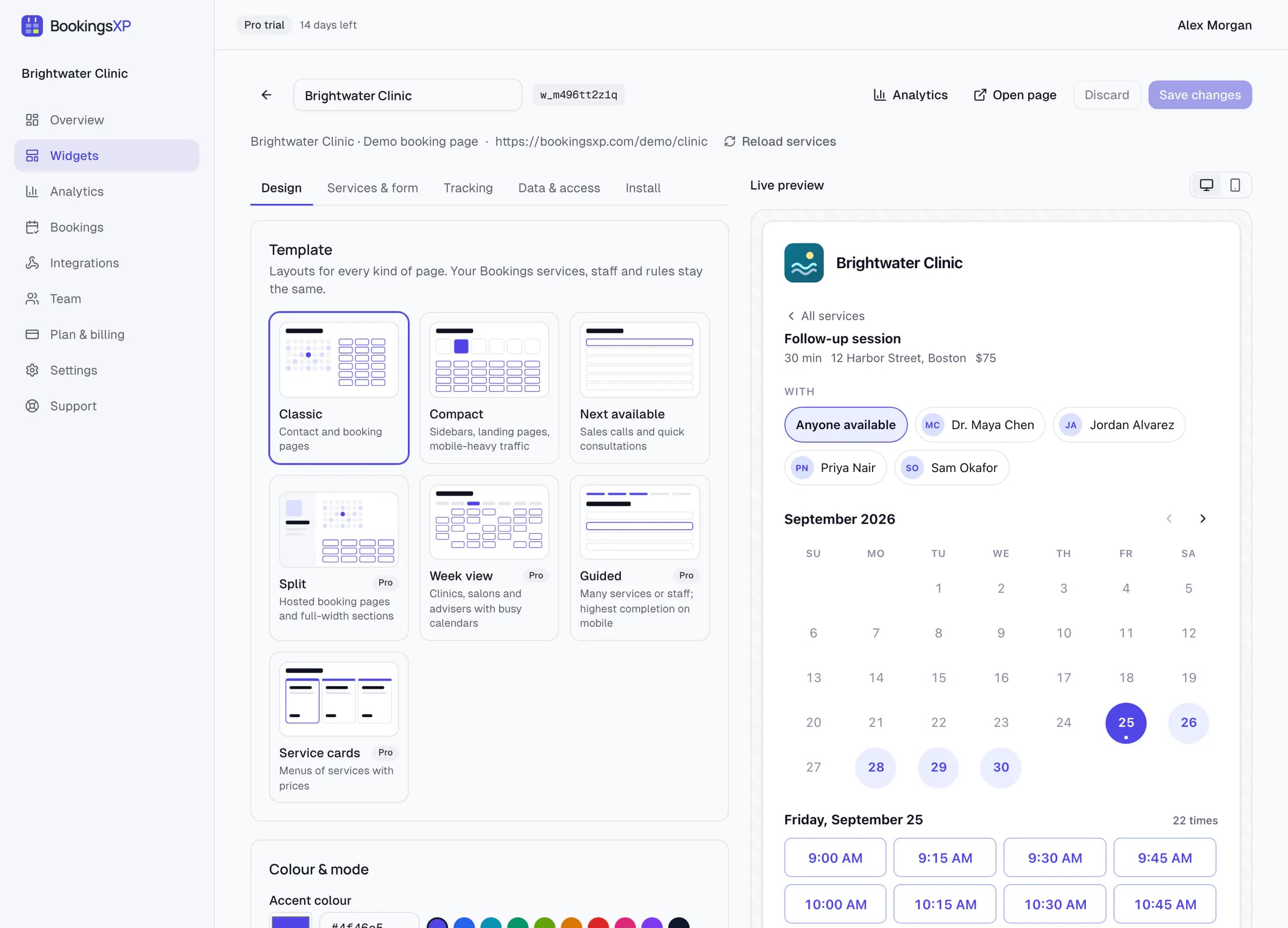
- Eight templates4 on Free, all 8 on Pro
- Classic, Compact, Next available and Profile on every plan; Split, Week view, Guided and Service cards on Pro. Switch any time without changing the code on your site.
- Accent colour and dark mode
- Your brand colour on buttons and selected times, in light mode, dark mode or following the visitor's system setting.
- Full stylingPro and above
- Five font choices, corner radius, comfortable or compact density, solid, soft or outline buttons, and your own or a transparent background.
- No BookingsXP badgePro and above
- Free widgets show a small “Powered by BookingsXP” line; paid plans remove it.
- Business header and logo
- Show or hide your business name and logo from Microsoft Bookings above the calendar.
- Visitor time zone
- Times open in the visitor's own time zone, with an optional zone picker, a 12 or 24 hour clock and your choice of first weekday.
- Staff choice
- Follow your Bookings setting, make choosing a person optional, or hide it, and limit which staff are offered.
- Your wording
- Set the headline, the booking button text and the confirmation title and message.
- Consent checkbox
- An optional required checkbox before booking, for a privacy or marketing consent statement you write.
- Add to calendar and manage link
- The confirmation offers an .ics download and Microsoft's link to change or cancel the booking. Each can be turned off.
- Email verification codes
- If your Bookings page asks for a one-time code, Microsoft emails it to the visitor and the widget asks for it before confirming.
- Keyboard and screen readers
- The calendar is a labelled grid you move through with arrow keys; month changes and the confirmation are announced; reduced motion is respected.
- Built for phones
- Every template adapts below its designed width; Compact and Next available are made for sidebars and small screens.
Embeds and platforms
One script and one element on any page that accepts HTML, or a plugin or package for your platform.
- Inline embed
- The widget sits in your page, resizes to its content on every step and loads when it nears the viewport.
- Popup button
- A button on your page that opens the widget in a dialog.
- Floating button
- A button fixed to the bottom-right corner of every page that includes it.
- Plain iframe
- No JavaScript at all, for locked-down pages. The booking works; page events and attribution need the script.
- Link-only modeNo account needed
- Point the element at your Bookings link with no BookingsXP account: free templates, the badge and dataLayer events only.
- WordPress plugin
- A shortcode and an editor block, with a settings page for your default widget.
- Site builders
- Webflow, Squarespace, Wix, Framer and HubSpot pages through their HTML or embed blocks; a div form for builders that strip unknown tags.
- Framework components
- Typed wrappers for React and Next.js, Vue, Svelte and Astro. Their npm release is pending; the script embed works in every framework today.
- JavaScript API
- Render widgets, pass prefill and listen for booking events from your own code.
- Allowed domains
- Restrict each widget to your own domains so nobody else can embed it.
- Small loader
- The script is about 8 KB gzipped and loads with async, so it does not hold up your page.
Hosted booking pages
Every widget also has its own page, for places that take a link rather than an embed.
- Hosted booking page
- A page at bookingsxp.com/book/<name> with the same template and colours, for email signatures, QR codes, social bios and ads. No website needed.
- Custom address
- Pick the name after /book/, checked for availability as you type. The widget's original link keeps working and redirects to it; Microsoft trademarks and reserved words are not allowed.
- Optional search indexing
- Hosted pages stay out of search engines by default. Turn indexing on per page and it is added to the sitemap.
- Tracked like the embed
- Add UTM tags to the link and they flow into the booking notes and your reports.
Tracking and attribution
The booking happens on your page, so the tags you already use can see it, and the source is written into the booking itself.
- One tracking switch
- Turn every dataLayer, GA4, Google Ads, Meta and LinkedIn event and the source summary in the booking notes off at once, per widget or for the whole workspace. Your IDs are kept for when you turn it back on.
- Tag Manager events
- Every step, from widget viewed to booking completed, is pushed to the dataLayer as bookingsxp.<event>.
- GA4 events
- Add your measurement ID and the widget sends generate_lead and three step events to GA4 through gtag.js on your page.
- DOM events and callbacks
- Listen for bookingsxp:<event> on the window, or pass onBooked to the JavaScript API.
- Source in the booking notes
- UTM tags, which ad click ID was present, the referrer, the first page and a BXP reference are written into the booking's notes in Microsoft Bookings.
- Source as a question answer
- Optionally answer a hidden custom question, such as “How did you hear about us?”, so the source appears in Microsoft's own export.
- 90-day attribution
- The campaign that first brought a visitor is remembered for 90 days, so a booking made from a bookmark next week is still credited.
- Thank-you page redirect
- Send visitors to your own confirmation page after booking, with the booking ID, service and start time in the URL.
- Google Ads conversionsPro and above
- Fires your conversion when Microsoft confirms the booking, with the booking ID as the transaction ID so it is not counted twice.
- Enhanced conversionsPro and above
- Adds the visitor's email, hashed with SHA-256 in their browser, to the Google Ads conversion. Off until you turn it on.
- Meta and LinkedIn conversionsPro and above
- A Meta Schedule event with the booking ID as event ID, and a LinkedIn conversion, when those tags are on your page.
Analytics
Reports in the BookingsXP dashboard, counted without cookies or personal data.
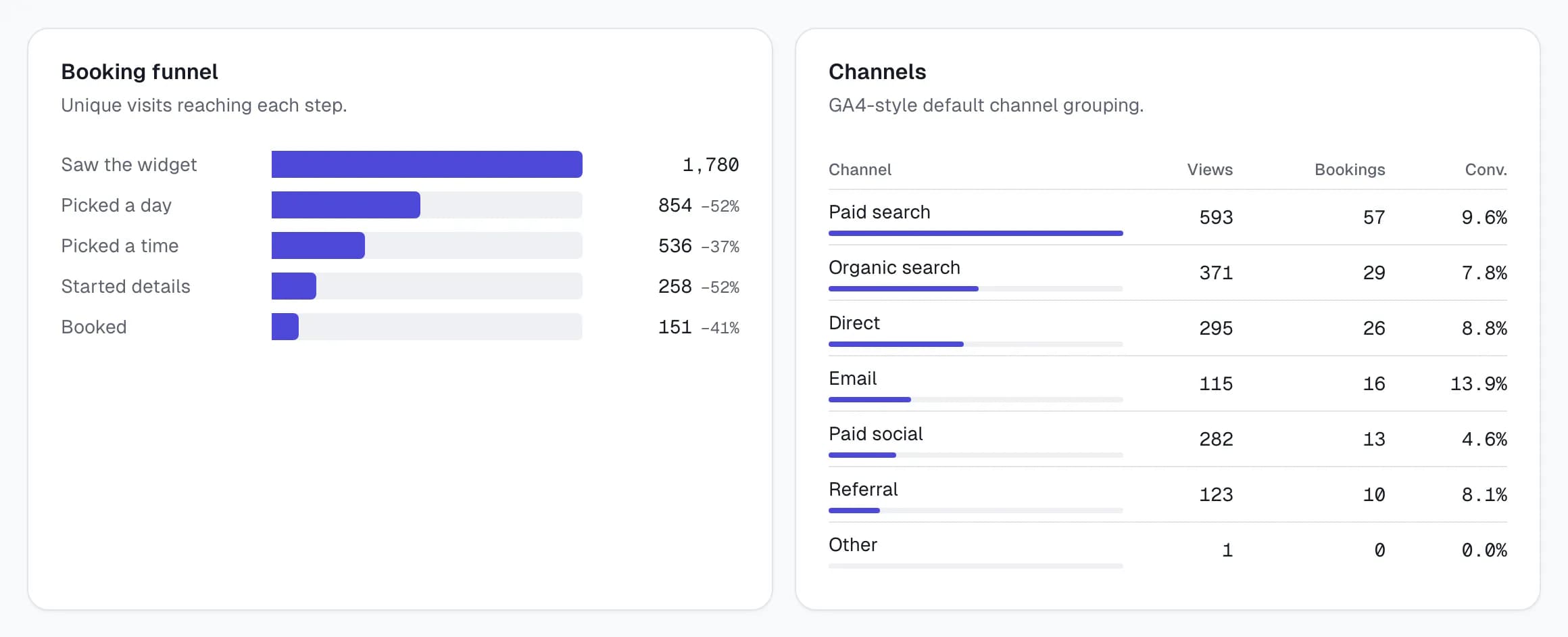
- Views, bookings and conversion rate30 days on Free, 12 months on Pro, 24 on Business
- Visits that saw a widget, confirmed and failed bookings, and bookings divided by views, with a daily chart.
- Missed demand
- Visits that opened the widget and found no open times: the number to show whoever sets staff hours.
- Booking funnelPro and above
- Saw the widget, picked a day, picked a time, started details, booked: where visitors drop off.
- Channels, sources and campaignsPro and above
- GA4-style channel grouping, source and medium, and every utm_campaign, each with views, bookings and conversion rate.
- Pages, services and devicesPro and above
- Which pages, services and device types turn visits into bookings.
- When appointments landPro and above
- A weekday by hour heatmap of booked appointments, in your time zone.
- Event exportPro and above
- Every event in the period as a CSV file.
Data, webhooks and integrations
Optional. Nothing personal is stored until you switch on Store bookings for a widget.
- Store bookings30 days on Free, 12 months on Pro, 24 on Business
- A per-widget switch, off by default, that keeps a copy of each booking with its answers and source.
- Bookings list
- One searchable list across all your widgets: find a booking by name, email, reference, service or campaign.
- Erase by email
- Delete every stored booking for one email address in one step, for data-subject requests.
- Bookings CSV exportPro and above
- Stored bookings with customer, answers and attribution, for spreadsheets and CRMs that import files.
- Signed webhooks5 endpoints on Pro, 25 on Business
- booking.created and booking.failed POSTed as JSON to your endpoints, signed with HMAC-SHA256.
- Retries and delivery logPro and above
- Failed deliveries are retried up to 8 times over about two hours; every attempt is logged and can be resent by hand.
- Microsoft Teams alertsPro and above
- Each booking posted to a Teams channel as a card, through the channel's Workflows webhook. No Microsoft 365 permissions needed.
- Slack alertsPro and above
- Each booking posted to a Slack channel through an incoming webhook, with the source and campaign.
- Zapier, Make, n8n and Power AutomatePro and above
- Start a zap, scenario, workflow or flow from each booking and send it to your CRM, sheet or inbox.
Extras Microsoft Bookings can't do
Settings in the widget that Microsoft's own booking page does not offer. Your Bookings page itself is not changed.
- Prefill
- Fill in name, email, phone and notes from attributes, the JavaScript API or the hosted page URL. Values never go into the widget's iframe URL.
- Daily booking cap
- Stop offering a day once a set number of bookings have come through the widget for it. Microsoft's own page is not capped.
- Help text under questions
- Add a line of guidance under any custom question from your Bookings page, such as what to put in a policy number field.
- Email typo check
- Suggests a fix for common domain typos such as gmial.com before the booking is sent, so confirmations reach the visitor.
- Per-staff and per-service links
- Open the widget or hosted page on one person or one service with an attribute or a URL parameter. Microsoft Bookings has no per-staff link.
Privacy and security
BookingsXP works from your public Bookings link. Microsoft stays the system of record.
- No Microsoft sign-in or admin consent
- No app registration, Graph permissions or tenant approval. If you can copy your Bookings page link, you can set it up.
- No personal data by default
- Names, emails and answers go to Microsoft Bookings and are not kept, unless you switch on Store bookings.
- No cookies
- The loader and the widget set no cookies. Funnel counts use a random ID that lives only in memory.
- Global Privacy Control
- When the browser sends GPC, or your consent tool sets window.bxpConsent = false, attribution is reduced to the page path and referring site.
- No IP addresses stored
- Rate limiting uses a hash salted with the current day; the raw address is never written down.
- Isolated iframe
- The widget runs in its own iframe and talks to your page only through messages checked against both origins.
- Retention by plan30 days on Free, 12 months on Pro, 24 on Business
- Analytics and stored bookings are deleted after your plan's period; webhook delivery logs after 30 days.
Team, billing and API
Plans are per organisation. Prices in US dollars.
- Workspace defaults
- Set brand, time and language, button and confirmation text, tracking, privacy, allowed websites and search indexing once for every widget. Change the brand colour once and every widget that follows updates live, with no re-pasting.
- Per-widget overrides
- Each section has a “Use workspace default” switch in the widget editor. The Bookings link, template, services and staff, headline, daily limit, thank-you page and page address are always per widget.
- Widgets1 / 5 / 50, unlimited on Enterprise
- One widget on Free, 5 on Pro and 50 on Business, each with its own Bookings link, template and tracking.
- Team members1 on Free, 3 on Pro, 10 on Business
- Invite colleagues to your organisation's dashboard.
- Free planFree
- $0 with no card and no time limit: one widget, four templates, events and attribution.
- 14-day trialPro, Business
- Try Pro or Business once, without a card. When the trial ends you are back on Free and nothing becomes read-only.
- Monthly or yearlyPro, Business
- Pro is $9 a month or $90 a year; Business is $29 a month or $290 a year.
- REST APIBusiness and above
- API keys for reading your widgets, stored bookings and analytics from your own systems. Keys are shown once and stored hashed.
- EnterpriseEnterprise
- Custom limits and retention, a DPA, security questionnaire and SLA, and priority onboarding.
A plan name shows where a feature starts, and higher plans include everything below them: Free, Pro at $9 a month, Business at $29 a month, Enterprise on request. Compare plans. BookingsXP is independent and not affiliated with or endorsed by Microsoft.
Start with one widget
The Free plan covers the widget, four templates, GA4 and Tag Manager events and the source in every booking. Upgrade when you need reports, ad conversions or webhooks.
No Microsoft sign-in or admin consent. Free plan, no card.